Quick Links
It’s not overly dramatic to say that we live in the golden age of gaming keyboards. Razer has played a large part in the growing popularity of these peripherals, ever since debuting the first mechanical keyboard in 2010. The original BlackWidow became an instant bestseller and in the following years, and the company introduced moredurable mechanical switches and customizationthrough software. The Razer Huntsman V2 Analog is in many ways a product of the evolution of these devices, but it also has loftier ambitions that transcend traditional keyboard capabilities.
RELATED:What Keyboards Do the Pros Use?
The Razer Huntsman V2 Analog is one of the most expensive wired gaming keyboards on the market, so naturally, it has a high bar to clear. Conventional mechanical switches are durable enough compared to membrane alternatives, but Razer has gone even further with its analog optical switches. These small components promise not only increased longevity but also the ability to trigger different commands depending on how much force a gamer exerts.
Perhaps the Razer Huntsman V2 Analog’s loftiest goal is to simulate the button presses of a game controller. I recently had the opportunity to put the keyboard through its paces, seeing if it truly could replace other gaming peripherals.
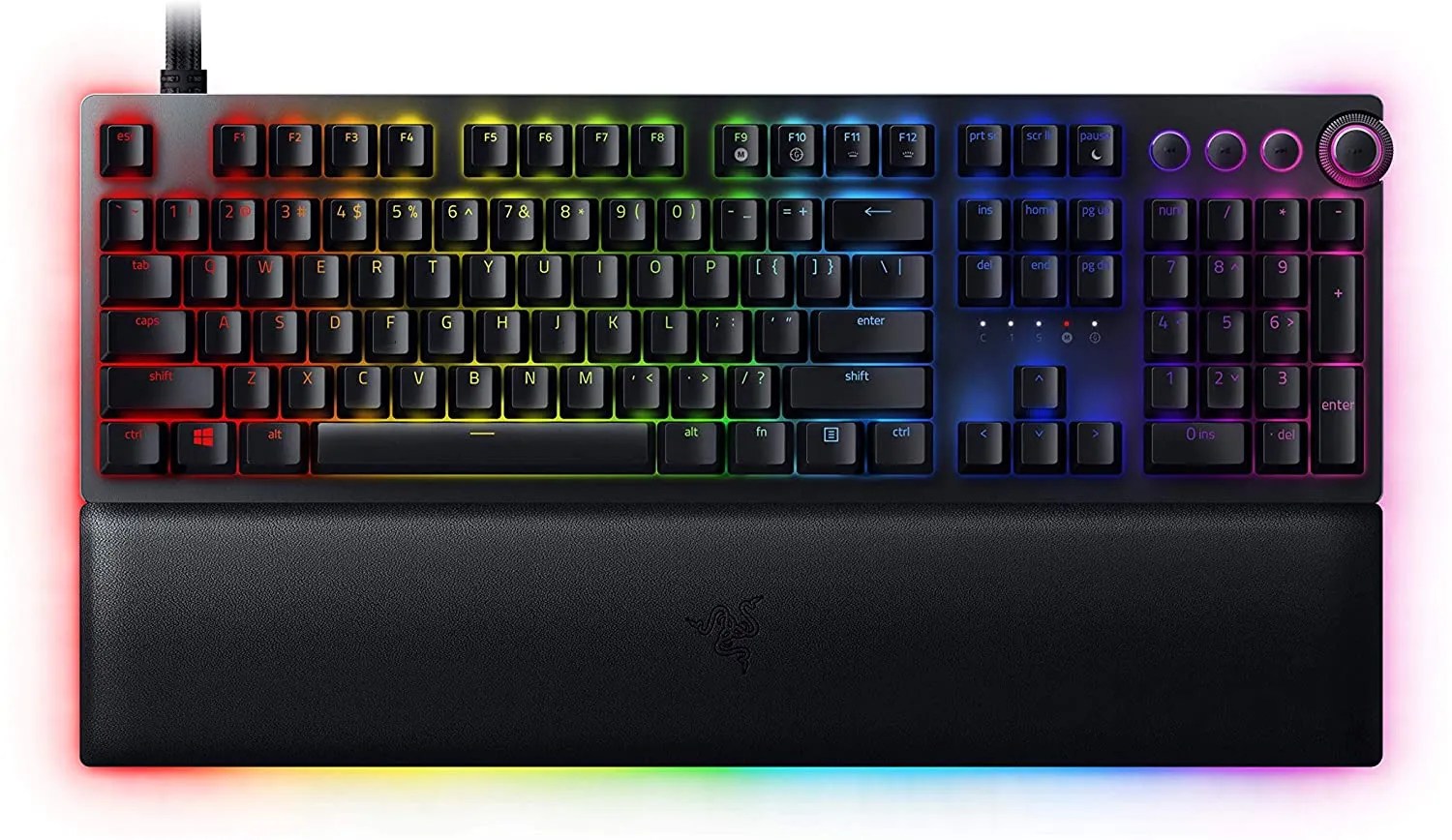
Razer Huntsman V2 Analog
The Razer Huntsman V2 Analog is an analog switch-based wired keyboard that is at the highest tier of Razer’s premium mechanical gaming keyboards. It features USB 3 passthrough, adjustable switches, and dedicated media keys as part of its USB-C powered feature set.
Contents of Package
Razer goes to great lengths to carefully package its premium gaming keyboards. Weighing in at 2.64 pounds, the Razer Huntsman V2 Analog ships suspended with foam pieces on the side of the company’s traditional green box. The leather wrist rest is kept separate from the keyboard in a plastic sleeve. Other than the essential hardware, buyers will encounter a basic instruction manual and an assortment of Razer stickers.
Installation
The Razer Huntsman V2 Analog uses a dual USB cord with both a type-A connector for the keyboard’s USB 3.0 passthrough port and a type-C connector for the keyboard itself. It seems a bit strange for the essential USB cable to use a type-C connector, but Razer provides an adapter that most gamers will make use of. Unfortunately, both USB cables are hard-wired to the Razer Huntsman V2 Analog, so cable management becomes more complicated. The flexible braided cables, however, make the cords easy to wrap around any desk edge.
The leather wrist rest attaches with magnets to the bottom of the Razer Huntsman V2 Analog. When on a desktop, you can slide around the keyboard and wrist rest as one solid unit but don’t expect to pick up and move them without the bottom piece detaching.

Design
As a full-sized keyboard, the Razer Huntsman V2 will take up considerable space on a desk with the large magnetic plush leather wrist rest accompanying it. If you are like me and prefer to use just wrist support for a mouse, the keyboard becomes much more streamlined without this optional part. I must admit that the wrist rest is one of the most comfortable that I have encountered and also has LED light strips trimming it.
Of course, what is most visible to gamers are Razer’s Doubleshot PBT keycaps which are constructed to avoid letters fading over time. Underneath the keys are theanalog optical switches which are not traditional mechanical switches, but nevertheless provide satisfyingly loud clicks. The keycaps also allow Razer Chroma RGB lighting to shine through them. You can see below what a torn-down Razer Huntsman V2 Analog looks like, and I found taking just a few of the keys off and reattaching them to be effortless. It’s still a tedious process, but easily removable keys make thoroughly cleaning a keyboard a less dreadful task.

On the front top right of the keyboard sits 3 media control buttons as well as the multi-function digital dial. On the left side of the Razer Huntsman V2 is the USB 3.0 passthrough port, useful for quickly connecting flash drives or wireless dongles.
Although most experts believe it negatively affects a keyboard’s ergonomic qualities, there are 2 kickstands underneath the Razer Huntsman V2 to elevate it, if a gamer so desires.

The Razer Huntsman V2 is an exceptionally sturdy and well-built peripheral. The aluminum matte top plate adds to its heftiness but also keeps the keyboard from sliding around during important gameplay moments. Razer doesn’t take many chances with its basic rectangular design and slightly rounded corners, but the device should blend in with almost any gaming setup.RELATED:What Keyboards Do the Pros Use?
Features and Performance
The Razer Huntsman V2 is impressive enough to look at, but how it performs during intense gaming sessions is what most gamers are interested in. Optical keyboard switches, as opposed to traditional mechanical switches, use light beams to measure how far a key is pressed and does not rely solely on physical components making contact. In theory, this makes optical switches even more durable but also introduces a host of other features.
The main selling point of the keyboard is itsanalog optical switches which allow for dual-step actuation. Essentially, this means that users have finer control in games utilizing partial or full keypresses. The amount of force used can determine whether a player walks or runs during gameplay. Additionally, in the Razer Synapse software, gamers are able to program specific commands depending on an actuation height ranging from 1.5 to 3.6 mm.

Another unique ability of the Razer Huntsman V2 is the ability for keys to act like a game controller’s d-pad. The switches and keycaps are able to move in something resembling a 360-degree motion. In my experience, this was very difficult to execute in games, but with practice, it’s possible to use keys to simulate the 8-way movement of controllers.
No Razer gaming keyboard is complete without a healthy dose of Razer Chroma RGB effects. The Razer Huntsman V2 makes extensive use of this lighting, with even the media keys illuminated. The volume control dial is programmable so that when a system is muted, it can turn red or another specified color. Spacing between the keys is just enough to allow some additional lighting to peek through. The underglow RGB effects on the sides of the keyboard won’t cast much light on a dark surface, but nevertheless, add to the premium look of the device. I found that through the Synapse app, I was easily able to coordinate the lighting with myRazer Naga Pro mouseandGoliathus Extended Chromamousepad.

RELATED:Razer Naga Pro Gaming Mouse Review
As a complete package, the Razer Huntsman V2 performed admirably during the time that I tested it. Keypresses weren’tquite as loud as other mechanical keyboardsthat I’ve used and gave a slighter softer response which is necessary for the dual-step actuation. For my typing style, the default actuation settings required some adjustment, as I frequently would press a key too lightly to get the desired response. To fully benefit from the analog optical switches, some practice is necessary during gaming. The best settings for me were a balance of having multiple commands per key at my disposal, while not affecting typing during general productivity.
Unlike with some other keyboards, I actually found myself using the 4 media keys on the Razer Huntsman V2 on a regular basis. They are strategically positioned not to interfere with normal typing and the multi-function dial allows for a high degree of control over volume levels. I did experience a strange recoiling effect where moving the dial to the right first lowered the system volume before raising it, so gamers need to demonstrate some finesse when using it.

Another annoyance I ran into while experimenting with the Razer Huntsman V2 is related to its gamepad-like functionality. Some users are surprised when they discover that Razer actually installs the keyboard as a controller in Windows. In theory, this would not pose a problem, but I discovered that some games would prioritize the Razer keyboard controller over mydependable Xbox gamepad. Certain titles are fussy to the point where only the primary gamepad can navigate menus. Selecting the Xbox controller as the preferred gamepad in Windows did little to rectify the situation. Some gamers have resorted to uninstalling the device driver for the Razer controller, but this won’t stop the driver from reinstalling itself in the future.
Software and Configuration
The Razer Huntsman V2 allows gamers to toggle between 5 onboard keymapping profiles. However, most of the customization action takes place in the Razer Synapse software. As one of the main options available, users can enable gaming mode to prevent keys from minimizing or switching to other windows while playing games. With the Razer Huntsman V2, gamers also have the option to enable typing mode, which disables any actuation settings with the analog optical keys. Finally, gamepad remapping lets users assign WASD keyboard commands to connected controllers. This feature proves especially handy in games without native gamepad support, which normally would require third-party software.
Things get much more complicated in Synapse when you click on individual keys in the visual keyboard representation. The functions a gamer can assign to a particular key are nearly endless with anything from controller and mouse commands to switching keyboard or RGB lighting profiles. Surprisingly, recording macros requires installing a separate module in Synapse. Once that is running, gamers can also assign macros to almost any possible key.

RELATED:Best Lighting for Your Gaming Room in 2023
All of these options are fairly standard in other peripheral software, but the actuation functionality is not. Gamers can fine-tune exactly when a key press triggers a command, with a low actuation point ideal for instant response times and higher actuation points better for less common actions. Copying the same settings to every key is a nightmare scenario, but fortunately, Razer provides the ability to apply each key’s customization across the entire device. Turbo mode can also be set to repeat the same command a specified number of times. Hypershift is a feature that users of other Razer gear are more familiar with, which temporarily unlocks secondary commands for each key.
The options for adjusting RGB effects on the Razer Huntsman V2 are also extensive. Besides basic lighting profiles like breathing, wave, and wheel, the Chroma Studio module can create far more detailed profiles and assign specific colors to certain keys. The fun doesn’t end there, with the possibility of having the keyboard lighting react to sounds or what is showing on a display. As is the case with allRazer Chroma devices and some smart lights, when certain games are launched, the keyboard will use different colors to represent available commands and change colors after activation.

Razer goes to great lengths to keep the Synapse software relatively easy to navigate. Still, with a dizzying amount of customization offered, it can often take some time to find exactly what settings you are looking for. I do feel that certain optional modules like the Macro addon should be part of the default software configuration, but it’s understandable that Razer wants to prevent Synapse from becoming overly bloated.
Conclusion
The Razer Huntsman V2 Analog is not abudget gaming keyboardbut rather a high-end gaming peripheral with a steep asking price, especially for a wired device. After using it every day for months, the two terms that best summarize the keyboard are quality and innovation. The Huntsman V2 Analog is a serious piece of gaming gear, and its weight and substantial dual USB cables make it not practical for traveling with. Even so, it’s hard to imagine the keyboard succumbing to even the most punishing gaming action due to both its build quality and unique optical switches. As a bonus, the leather wrist rest has a rather luxurious feel and extends the underglow RGB lighting that is present on the rest of the keyboard.
The best candidates for the Razer Huntsman V2 Analog include any gamer who prefers to use a keyboard more than a mouse or game controller. The analog optical switches enable users to fire off different commands using the same keypresses, while also simulating the movements of a controller’s directional pad. This new type of functionality inevitably has a learning curve, but practical applications like using the WASD keys to both walk and run have appeal to most gamers. As admirable an attempt as Razer makes with the Razer Huntsman V2 Analog, it won’t replace game controllers entirely, at least until more refinements are made.

RELATED:The Best Wired Controllers in 2023
Despite not quite fulfilling all of its objectives, the Razer Huntsman V2 Analog deserves consideration from any buyer looking for a premium gaming keyboard with some industry-leading technology.
Related Products
If the Razer Huntsman V2 Analog offers features that seem too intimidating to you, or it simply costs too much, there is no shortage of alternative gaming keyboards to choose from. For a marginally lower price, theSteelSeries Apex Proincludes OmniPoint 2.0 mechanical switches which offer adjustable actuation without simulating a gamepad.
To stay in the Razer family, there is another contender confusingly called theRazer Huntsman V2. This keyboard boasts an 8000Hz polling rate and even less latency than the V2 Analog but lacks the ability to assign multiple commands to the same keys. The standard Huntsman V2 offers a choice between quieter Linear or louder Clicky switches to suit any gamer’s preferences.
Several hundred dollars is a significant amount of money to drop on a wired keyboard. When wireless is a requirement, Razer does offer a similar mechanical keyboard as the Razer Huntsman V2 Analog without cords. TheRazer Blackwidow V3 Proincludes the Hyperspeed wireless protocol and Bluetooth which enables up to 3 devices to stay connected to it simultaneously.
RELATED:The Best Wireless Gaming Mice in 2023
Whichever device has the honor of becoming your new gaming keyboard, we hope it provides you with many years of reliable performance.
$168
$140
$230
FAQ
Q: Should I get a keyboard with RGB lighting?
Some people love RGB while others hate it. Whether you need it on your keyboard is all about personal preference. RGB lighting can help you see the keys more easily. Some keyboards allow you to lower the brightness of the lights so that they can be as bright or easy on the eyes as needed.
Q: Is a wireless mechanical keyboard better than a wired one?
Most wireless mechanical keyboards do use 2.4Ghz as a wireless band with a USB dongle. This is relatively low latency versus other more mainstream options such as Bluetooth; some keyboards support both, for example. Keyboards like the ROG Azoth and the Logitech G915 have come a long way, offering 1ms and 1000Hz wireless polling to help competitive gamers have a similar low-latency experience that wired gamers are accustomed to.
Q: What makes mechanical keyboards better than cheaper membrane keyboards?
While more expensive, mechanical keyboards generally last longer than cheaper membrane options. Mechanical keys give a satisfying clicking response to button presses, while membrane keyboards feel mushy. However, not all mechanical keyboards are the same quality, with some using more plastic in their builds than others.
